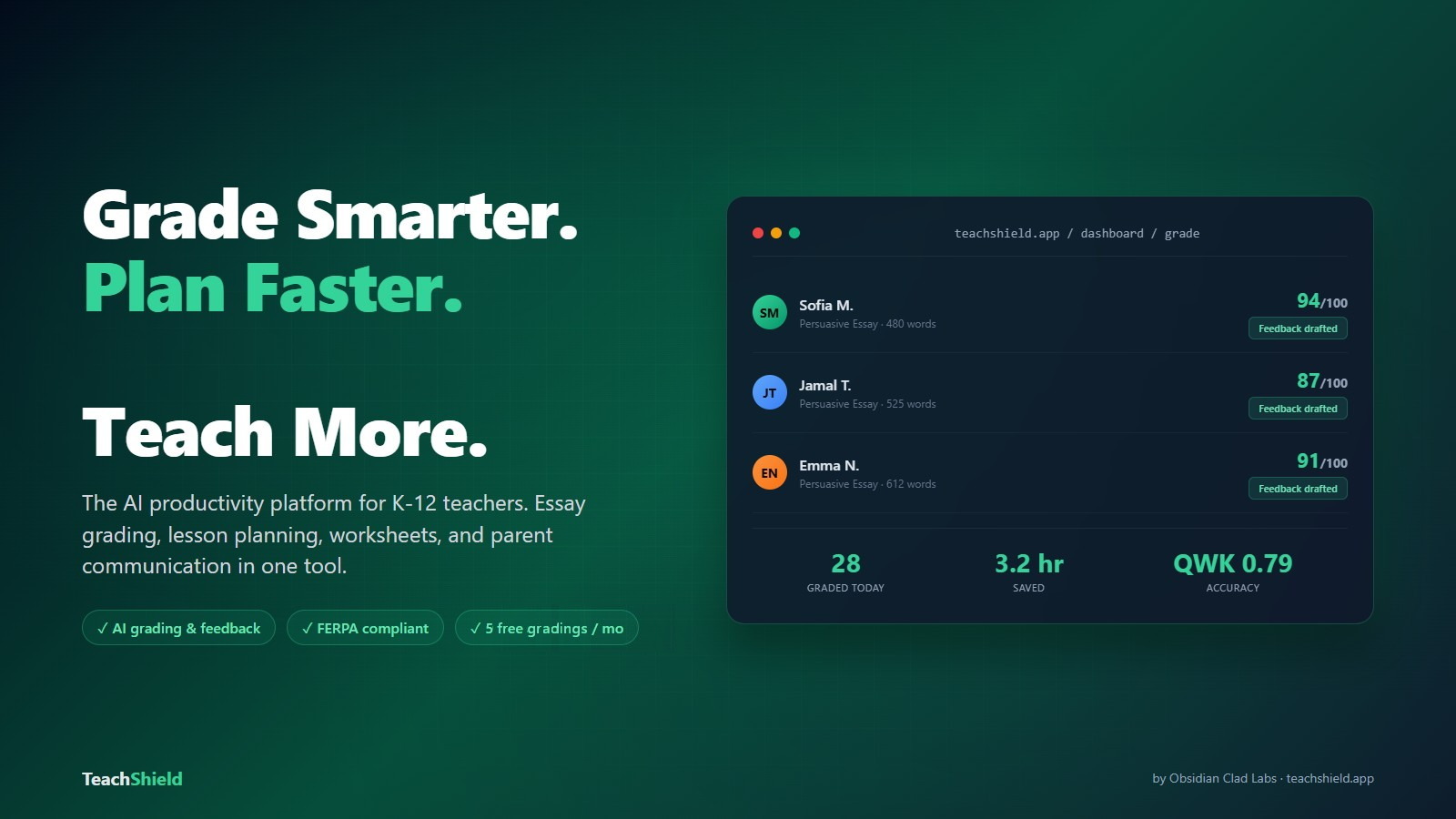
Grade Smarter.
Plan Faster.
Teach More.
TeachShield.
The teacher productivity platform built with love for our friends, family, and you.
Stop losing your evenings and weekends to grading and paperwork. We handle the busywork so you can focus on what you became a teacher to do. Teach your students.
The Busywork Around the Teaching
Burnout is real, and the hours that cause it mostly land after the last bell — grading, reports, parent emails and admin work that follow you home.
Everything Teachers Need. One Platform.
Not 80 shallow tools that don't talk to each other. One integrated workflow where grading informs planning, planning informs differentiation, and everything connects.
Instant Grading
Upload essays, quizzes, or scan handwritten work with your phone. Get scores against your rubric and personalized feedback drafted in seconds.
Smart Lesson Planner
Auto-aligned to Common Core, NGSS, and state standards. Suggests activities, resources, and differentiated materials for every level.
Differentiation Engine
Track IEP, 504, ELL, and gifted flags per student. Generate standards-aligned lesson plans tailored to different learning levels and needs.
Parent Communication Suite
Progress updates, conference scheduler, and direct parent messaging. 9 communication types with professional templates. Every interaction logged automatically.
Data Dashboard & Analytics
Unified view of grades, attendance, and behavior. At-risk student alerts. Auto-generated admin reports and report card comments.
Paper-to-Digital Bridge
Snap a photo of handwritten assignments. OCR converts them to digital text, we grade them, and results flow into your gradebook.
Substitute Teacher Portal
One-click sub plans with rosters, schedules, and classroom procedures. Generate, print, or download ready-to-go plans from your weekly planner.
Originality Detection Built-In
Built-in content originality checker analyzes writing patterns to flag potentially generated content alongside your grading results.
How It Works
The AI essay grader for K-12 teachers — 30-second rubric scores, FERPA-aware.
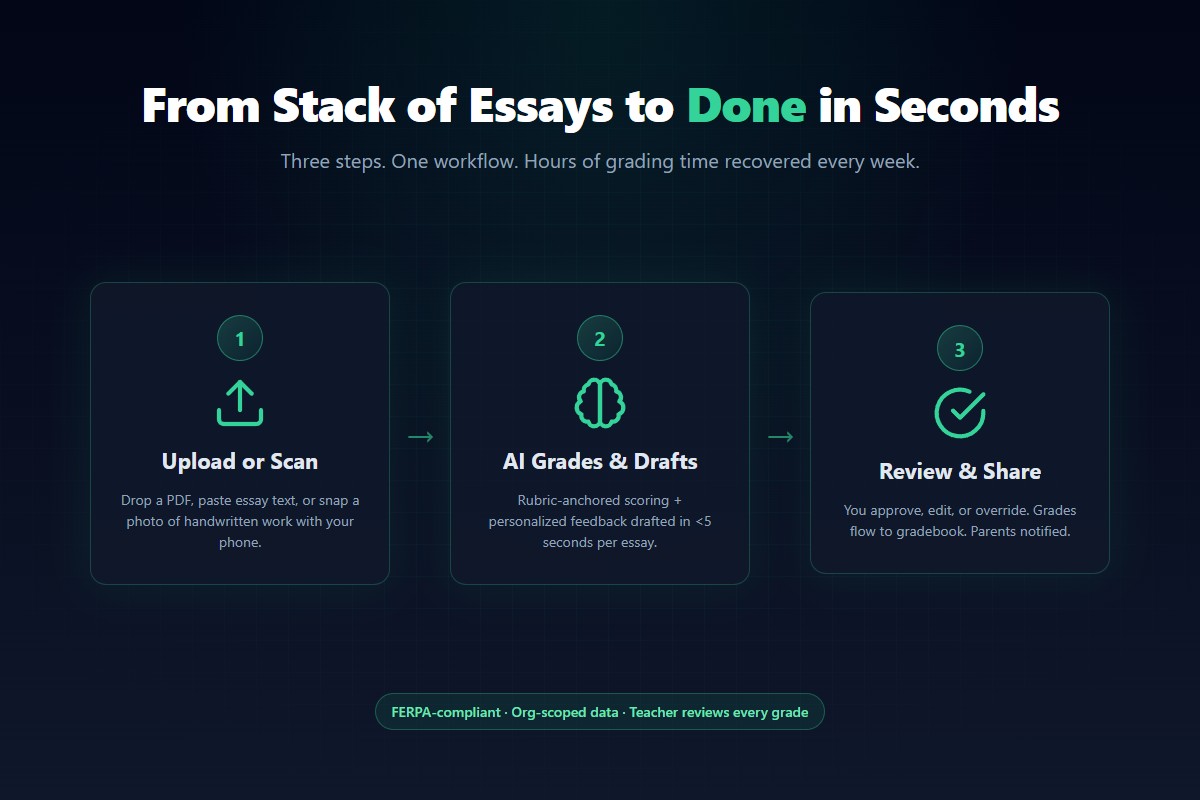
Upload or Scan
Drop a PDF, paste text, or snap a photo of handwritten work.
We Grade & Draft Feedback
Your work is evaluated against your rubric with personalized comments drafted instantly. You review and approve.
Insights Flow Everywhere
Grades update your dashboard. Common mistakes auto-generate tomorrow's lesson. Parents get notified.
Grading Accuracy You Can Trust
Scoring is anchored to your rubric, with reasoning you can read, and always reviewed by you before it reaches a student.
The Scoring Engine
DeepSeek V4
Scores against the rubric you set, then generates detailed, personalized feedback calibrated to that score. Quotes student work, suggests specific improvements.
Rubric-anchored. Scored against the criteria you set, so results reflect what you actually teach.
Transparent. Every score comes with the reasoning behind it, so you can check the work.
Teacher-in-the-loop. You review and approve every score before a student sees it.
Built for Every Teacher
Specialized features for your role, not one-size-fits-all.
Classroom Teachers
- Instant grading for essays, math, quizzes
- Paper scanning via phone camera
- Seating chart generator with data overlay
- Bell ringer & exit ticket generator
Substitute Teachers
- One-click sub plan generator
- Print or download ready-to-go plans
- Student roster with notes
- Schedule + procedures overview
Virtual Teachers
- Virtual meeting scheduling (Zoom, Meet, Teams)
- Smart lesson plans for remote delivery
- Conference email blasts with meeting links
- Full gradebook + attendance tracking
Special Ed Teachers
- IEP / 504 / ELL / Gifted flags per student
- Standards-aligned differentiated lesson plans
- Student records with learning profiles
- At-risk alerts in gradebook analytics
Teacher reviews
Written by signed-in TeachShield users and published after moderation.
Simple, Teacher-Friendly Pricing
Less than a coffee a day for unlimited grading. No contracts. Cancel anytime. Schools and districts get bulk discounts.
Free
Get started with the essentials
- 5 gradings/month
- AI lesson plans
- Essay, math, MCQ grading
- Detailed feedback & rubric scoring
- Basic classroom tools
Pro
For teachers who want their life back
- Unlimited gradings
- Handwriting OCR scanning
- Content originality detection
- Batch grading (20 at once)
- Unit plan generator (multi-week)
- Parent communication tools
- Deep Research reports
Power
For power users and department leads
- Everything in Pro
- Unlimited IEP/504 extractions (Pro: 10/month)
- Unlimited Upload-to-Worksheet conversions (Pro: 25/month)
Plans for Schools & Districts
School
Contact us for pricing
5+ teachers
- Everything in Pro for every teacher
- School admin dashboard
- Usage analytics
- Shared rubric library
- Centralized billing
District
Contact us for pricing
25+ teachers
- Everything in School plan
- District-wide admin portal
- Cross-school analytics
- Dedicated account manager
- SSO support
See our full pricing page for detailed comparisons & volume pricing.
How We Compare
Most tools do one thing. TeachShield covers grading, planning, communication, records, and inventory in one place.
| Feature | TeachShield | MagicSchool | Gradescope | CoGrader | Planbook | Canvas LMS | Schoology |
|---|---|---|---|---|---|---|---|
| Smart Essay Grading | Yes | Limited | Yes | Yes | No | No | No |
| Smart Math Grading | Yes | No | Yes | No | No | No | No |
| Paper Scanning (OCR) | Yes | No | Yes | No | No | No | No |
| Rubric-Based Feedback | Yes | Basic | Yes | Yes | No | Yes | Yes |
| Smart Lesson Planning | Yes | Yes | No | No | Manual | No | No |
| Visual Week Planner | Yes | No | No | No | Yes | No | No |
| Deep Research | Yes | No | No | No | No | No | No |
| Curated Book Lists | Yes | No | No | No | No | No | No |
| Smart Parent Messages | Yes | No | No | No | No | Manual | Manual |
| PTC Conference Planner | Yes | No | No | No | No | No | No |
| PTC Invite/Track/Remind | Yes | No | No | No | No | No | No |
| Full Gradebook | Yes | No | No | No | No | Yes | Yes |
| Student Records / Intake | Yes | No | No | No | No | Basic | Basic |
| IEP/504 Tracking | Yes | Basic | No | No | No | No | No |
| School Day Calendar | Yes | No | No | No | Yes | Yes | Yes |
| Teacher Notes & Templates | Yes | No | No | No | No | No | No |
| Supply Inventory Tracker | Yes | No | No | No | No | No | No |
| Run-Rate Forecasting | Yes | No | No | No | No | No | No |
| Differentiation Engine | Yes | Basic | No | No | No | No | No |
| Substitute Portal | Yes | No | No | No | No | No | No |
| Data Backup & Restore | Yes | No | No | No | No | Yes | Yes |
| 15+ Classroom Themes | Yes | No | No | No | No | No | No |
| All-In-One Platform | Yes | No | No | No | No | Partial | Partial |
| Free Tier | 5/mo | No | No | 5/mo | No | No | No |
| Starting Price | $3/mo | $99/yr | $1-3/student | $15/mo | $15/yr | Contact | Contact |
Comparison based on publicly available product information as of March 2026. Feature availability may vary by plan.
From the Blog
Real talk for teachers — written by the team building TeachShield.
Frequently Asked Questions
Everything teachers ask before their first grade.
Is AI grading accurate?
TeachShield uses rubric-anchored scoring rather than holistic guesswork. Each criterion is graded with explicit reasoning so teachers can review or override before sharing with students. See how it keeps grading accurate and fair at https://teachshield.app/accuracy.
Is TeachShield FERPA compliant?
TeachShield is built FERPA-aware: student PII is held in browser sessionStorage on the grading surface and is never persisted to third-party trackers. Each teacher's data is org-scoped and never shared across organizations. See https://teachshield.app/privacy for the full policy.
How much does TeachShield cost?
TeachShield is free for up to 5 grades per month. Grader is $3 per month for 500 grades. Pro is $15 per month for unlimited grading plus the full worksheet suite. Power is $29 per month and lifts the IEP/504 and Upload-to-Worksheet monthly caps. Worksheets are a Pro and Power feature, not Free.
Can students see AI feedback before the teacher reviews it?
No. TeachShield generates a draft of feedback for the teacher only. Teachers review and decide whether to share, edit, or discard each piece of feedback before any student sees it.
What worksheet types does TeachShield support?
TeachShield ships 39 worksheet types covering reading, vocabulary, math, science, and creative writing. Each is procedurally infinite, with server-rendered ReportLab PDF printouts and a WYSIWYG iframe preview. Worksheets are included in the Pro and Power plans.
Who builds TeachShield?
TeachShield is built by Obsidian Clad Labs LLC, a New Mexico software company. It is one of five products in the Obsidian Clad Labs portfolio.
What if I disagree with the AI's grade or feedback?
Every grade is a draft for the teacher. You can override the score, edit any feedback comment, or discard the entire response before it reaches a student. TeachShield is designed as a teacher assistant, not a teacher replacement — the final decision is always yours.
Does TeachShield integrate with Google Classroom or Canvas?
Direct Google Classroom integration is on the roadmap. Today, teachers paste student essays or upload photos of handwritten work, then export feedback as PDF or copy as text to paste into Canvas, Google Classroom, or any LMS. Email us at contact@obsidiancladlabs.com if integration is a deal-breaker for your school — we prioritize requests from real users.
What payment methods does TeachShield accept?
Payments run through Stripe, which accepts all major credit and debit cards (Visa, Mastercard, American Express, Discover) plus Apple Pay and Google Pay. The Free plan needs no payment method at all. You can cancel any paid plan at any time from your dashboard.
Get Your Time Back
Join the teachers who grade smarter, plan faster, and actually leave school at a reasonable hour. Free forever. Upgrade when you're ready.
Start Free TodayNo credit card required. 5 free gradings/month.